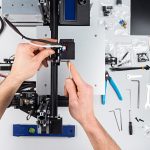
If you want one answer first: buy the Creality K2 Pro Combo if your budget stretches to it — it is the best all-round Creality printer of 2026, with a 300 × 300 × 300 mm enclosed build volume, an actively heated chamber and multi-colour printing in the box. On a mid budget, the K1C is the sweet spot for fast, enclosed printing, and the K1 SE gives you the same CoreXY speed for less. For a first printer, the Ender-3 V3 SE is the cheapest safe start, the Ender-3 V3 is the best-equipped Ender, and if you print big, the new Ender-3 V3 Mega Combo and the flagship K2 Plus Combo cover large parts at two very different prices. For fine detail and miniatures, the one resin pick is the HALOT-MAGE S 14K. The full top 10, with honest limitations for each machine, is below.
Quick picks: the top 10 at a glance
| # | Model | Best for | Build volume |
|---|---|---|---|
| 1 | K2 Plus Combo (with CFS) | Best overall — large multi-colour flagship | 350 × 350 × 350 mm |
| 2 | K2 Pro Combo (with CFS) | Best premium all-rounder | 300 × 300 × 300 mm |
| 3 | K1 Max | Best large enclosed printer with AI monitoring | 300 × 300 × 300 mm |
| 4 | K1C | Best for carbon-fibre and engineering filaments | 220 × 220 × 250 mm |
| 5 | K1 SE | Best value CoreXY speed | 220 × 220 × 250 mm |
| 6 | Ender-3 V3 Mega Combo | Best large-format and batch printing | 420 × 420 × 420 mm |
| 7 | Ender-3 V3 | Best full-feature Ender | 220 × 220 × 250 mm |
| 8 | Ender-3 V4 Combo | Best mid-budget Ender with multi-colour | 220 × 220 × 235 mm |
| 9 | Ender-3 V3 SE | Best for beginners / lowest entry price | 220 × 220 × 250 mm |
| 10 | HALOT-MAGE S 14K | Best resin printer for high-detail miniatures | 223 × 126 × 230 mm |
How we choose these printers
This is a buyer’s guide, not a lab test. We have not hands-on tested every machine on this list, and we do not award star ratings or review scores. Each pick is chosen from Creality’s published specifications, current store and retailer data, and the broad community consensus in owner forums and independent coverage: what each machine is good at, where owners report friction, and whether it is still on sale at a fair price today. Where a model has been discontinued or replaced, we say so and pick the current machine instead. If you want to understand a Creality printer you already own, our guides to calibrating an Ender 3 and to the 4.2.2 board diagram and pinout are a good place to start.
1. K2 Plus Combo — best overall, large multi-colour flagship
Who it’s for: makers and small studios who want one machine that does almost everything — big parts, multi-colour prints and engineering filaments — and can pay flagship money for it.
Key specs: 350 × 350 × 350 mm build volume; CoreXY; up to 600 mm/s with 30,000 mm/s² acceleration; actively heated chamber up to 60 °C; nozzle up to 350 °C; CFS multi-colour unit included (4 colours, expandable to 16); dual AI cameras; step-servo motors on all axes.
Strengths: this is the largest enclosed multi-colour machine Creality sells, and the only one here that prints a full helmet or a large batch of parts in one job, in colour, in materials like PA-CF and PPA-CF. The heated chamber and 350 °C hotend put it in genuine engineering territory, and the CFS doubles as dry, sealed filament storage.
Limitations: it is big, heavy (around 35 kg) and expensive to feed — multi-colour printing produces purge waste, and owners report the CFS occasionally needs babysitting on long colour jobs. Buy it for the size and heated chamber, not just the badge.
Check the latest price on Amazon
2. K2 Pro Combo — best premium all-rounder
Who it’s for: serious hobbyists and designers who want the K2 experience — heated chamber, multi-colour, high speed — in a slightly smaller, cheaper machine than the Plus.
Key specs: 300 × 300 × 300 mm build volume; CoreXY; up to 600 mm/s; actively heated chamber up to 60 °C; nozzle up to 300 °C; CFS included (4 colours, expandable to 16); dual AI cameras; step-servo motors.
Strengths: for most buyers this is the smarter K2. The 300 mm cube still swallows helmets and large functional parts, the heated chamber makes ABS, ASA and CF-nylon far more reliable than on a passively heated box, and the CFS is in the box rather than an expensive add-on. It is the machine we would point most upgraders to first.
Limitations: the nozzle tops out at 300 °C (the Plus reaches 350 °C), belt tensioning is manual rather than automatic, and Creality’s multi-colour software is still maturing compared with the most polished rival ecosystems.
Check the latest price on Amazon
3. K1 Max — best large enclosed printer with AI monitoring
Who it’s for: anyone who wants a big, fast, enclosed printer for single-colour work — prototypes, functional parts, larger models — without paying K2 money.
Key specs: 300 × 300 × 300 mm build volume; CoreXY; up to 600 mm/s; enclosed chamber with air purifier; AI LiDAR first-layer scanning plus AI camera monitoring; nozzle up to 300 °C; hands-free auto levelling.
Strengths: the K1 Max pairs the 300 mm cube with the most developed AI monitoring in the K1 line: the LiDAR checks the first layer and the camera watches for spaghetti failures, which matters most on long, large prints. It arrives assembled, calibrates itself, and at current sale pricing it undercuts everything else with this build volume.
Limitations: the chamber is enclosed but not actively heated, so very warp-prone materials are less forgiving than on the K2 Pro/Plus. There is no multi-colour system in the box — a CFS upgrade kit exists but costs extra — and it is a 2023-era design, so it lacks some newer K2 refinements.
Check the latest price on Amazon
4. K1C — best for carbon-fibre and engineering filaments
Who it’s for: users whose prints are functional first — brackets, gears, drone and RC parts — and who want to run abrasive carbon-fibre filaments without upgrading parts on day one.
Key specs: 220 × 220 × 250 mm build volume; enclosed CoreXY; up to 600 mm/s; Unicorn tri-metal nozzle up to 300 °C, ready for PLA-CF, PETG-CF and PA-CF; AI camera; carbon air filter; one-tap auto calibration.
Strengths: the “C” is for carbon, and it is earned: hardened tri-metal nozzle, all-metal extruder and an enclosure that keeps ABS and nylon blends stable. You get flagship K-series speed and auto-calibration in the smallest, cheapest enclosed box here, and community coverage consistently rates it the value pick for engineering materials.
Limitations: the 220 mm-class build volume is the compromise — large parts need splitting. The nozzle is a proprietary quick-swap format, it prints one colour at a time in stock form, and owners report PLA heat-creep on very long prints if the chamber gets hot, so manage door/lid ventilation for PLA.
Check the latest price on Amazon
5. K1 SE — best value CoreXY speed
Who it’s for: PLA, PETG and TPU printers who want K-series speed and auto-calibration at the lowest price, and who do not need an enclosure.
Key specs: 220 × 220 × 250 mm build volume; open-frame CoreXY; up to 600 mm/s with 20,000 mm/s² acceleration; tri-metal quick-swap nozzle; one-tap auto calibration; open-source Creality OS.
Strengths: mechanically this is close to a K1 without the box: same speed class, same build volume, same easy setup — Creality quotes under three minutes from box to printing because it arrives assembled. For everyday filaments it gives you most of the K1 experience for the least money, and the open frame makes maintenance and mods easy.
Limitations: no enclosure means ABS and ASA will warp without a workaround, there is no standard AI camera, and you lose the air filtration of the enclosed models. If engineering filaments are even a maybe in your future, the K1C above is the safer buy.
Check the latest price on Amazon
6. Ender-3 V3 Mega Combo — best large-format and batch printing
Who it’s for: cosplayers, prop makers, Etsy sellers and print farmers who need genuinely huge parts — or whole batches of smaller ones — and want multi-colour without a flagship price.
Key specs: 420 × 420 × 420 mm build volume; up to 500 mm/s; CFS Nano multi-colour unit (4 colours); automatic filament relay that switches to a backup spool when one runs out; dual Z and dual Y motors; input shaping for vibration control; launched 15 October 2026.
Strengths: nothing else near this price prints this big in colour. The 420 mm cube fits helmets, armour and large prototypes in one piece, and auto-relay is a real production feature: long prints no longer die at 3 a.m. because a spool ran dry.
Limitations: it only launched this month, so there is no long-term reliability record yet — early buyers are the test programme, as with any launch machine. It is an open-frame printer (no enclosure for ABS at this size), it needs a lot of desk, and TPU must be fed directly from a spool rather than through the CFS Nano.
7. Ender-3 V3 — best full-feature Ender
Who it’s for: hobbyists who want the most complete open-frame Ender — CoreXZ speed, high-temperature hotend and full auto-calibration — at a classic Ender price.
Key specs: 220 × 220 × 250 mm build volume; CoreXZ motion; up to 600 mm/s with 20,000 mm/s² acceleration; nozzle up to 300 °C, bed up to 110 °C; auto levelling and auto Z-offset; quick-swap tri-metal nozzle; die-cast aluminium gantry; 4.3-inch touchscreen.
Strengths: the V3 is the Ender formula fully modernised: it is fast, it calibrates itself, the rigid one-piece gantry removes the frame-squaring chore of older Enders, and the 300 °C hotend plus hardened-tip nozzle handle PLA-CF and PETG-CF. Pair it with the right profile — our Ender 3 Pro Cura settings guide explains the settings that matter — and it punches well above its price.
Limitations: open frame, so ABS/ASA need a draught-free corner or an enclosure tent; the AI camera is an optional extra rather than standard; and as a bed-slinger it moves the whole print back and forth, which is less ideal for very tall, heavy models at full speed.
Check the latest price on Amazon
8. Ender-3 V4 Combo — best mid-budget Ender with multi-colour
Who it’s for: makers who want multi-colour printing on an Ender budget — colour-coded organisers, figurines, cosplay pieces — without stepping up to a K2.
Key specs: 220 × 220 × 235 mm build volume; up to 500 mm/s with 12,000 mm/s² acceleration; CFS multi-colour unit included (4 colours, expandable to 16 with extra CFS units); die-cast unibody gantry; dual-gear direct drive; one-tap full-auto calibration; nozzle up to 300 °C.
Strengths: the V4 Combo replaced the discontinued Ender-3 V3 KE, and it is a clear step up: the rigid unibody gantry fixes the old frame-squaring problem, full-auto calibration removes the beginner friction, and the included CFS brings genuine four-colour printing — with RFID recognition on Creality spools — to a price the older Ender line never reached.
Limitations: the build height (235 mm) is slightly less than the V3’s, the line is newer so its community knowledge base is smaller than the huge V3/older-Ender libraries, and multi-colour printing on any single-nozzle machine means purge waste and slower colour prints.
9. Ender-3 V3 SE — best for beginners, lowest entry price
Who it’s for: first-time buyers, students and gift purchases — anyone who wants a real, current printer for the least money and the least setup stress.
Key specs: 220 × 220 × 250 mm build volume; up to 250 mm/s; CR Touch auto levelling plus auto Z-offset; Sprite direct-drive extruder (PLA, PETG, TPU); dual Z-axis; assembly in about 20 minutes.
Strengths: this is the cheapest machine on the list that we can recommend without caveats about it being obsolete: it levels itself, sets its own Z-offset, feeds flexible filament properly through a direct drive, and arrives as a quick three-step build that teaches you the machine as you go. The Ender community behind it is enormous, so every problem you might meet already has a documented fix — including in our step-by-step Ender 3 calibration guide.
Limitations: it is the slowest printer here (250 mm/s ceiling), there is no built-in Wi-Fi and no touchscreen — a knob screen and SD/USB workflow instead — and the open frame limits it to everyday filaments. It is a starter machine you may outgrow, which at this price is a fair trade.
Check the latest price on Amazon
10. HALOT-MAGE S 14K — best resin printer for high-detail miniatures
Who it’s for: tabletop gamers, jewellers, dentists-in-training and anyone whose prints are small and detail-obsessed — the one job filament printers genuinely cannot do as well.
Key specs: 223 × 126 × 230 mm build volume; 10.1-inch 14K mono LCD (13320 × 5120) with roughly 17–25 µm XY resolution; up to 150 mm/h in Dynax+ high-speed mode; Integral Light Source 3.0 for even curing; built-in activated-carbon air purifier; flip-up lid.
Strengths: resolution is the whole story with resin, and 14K on a 10.1-inch screen delivers crisp miniatures, jewellery masters and dental models with detail no FDM machine here can match. The S replaced the older MAGE line as Creality’s current US resin flagship, keeps the large-for-resin build plate, and adds fast-mode printing plus proper odour filtration in the box.
Limitations: resin is a workflow, not just a printer: parts need washing and UV curing (a wash-and-cure station is a sensible extra cost), resin needs gloves, ventilation and careful disposal, and the build area is small next to any FDM pick. If your models are large or functional, stay with filament.
Check the latest price on Amazon
What about the older classics — Ender 3, CR-10 and Ender 5?
The machines the old version of this page listed — the original Ender 3 and 3 Pro, Ender 5 and 5 Plus, and the CR-10 family — built Creality’s reputation, but they are discontinued-era designs: manual levelling, slower boards and no modern auto-calibration. If you already own one, it can still print well, and we keep our guides for them, from the CR-10 vs CR-10S Pro comparison to the Creality Slicer vs Creality Print breakdown. If you are buying today with a warranty and current support, buy from the list above instead — and if you spot a classic at a true clearance price, judge it against the Ender-3 V3 SE, which is the value bar now.
Coming soon, not yet ranked: Creality showed the K3 (with a fast nozzle-swap system for low-waste multi-colour) and the SPARKX i8 at IFA in September 2026. The K3 is at pre-order stage with no confirmed US retail price, so neither machine earns a Top 10 slot until you can actually buy one and independent results exist. We will update this guide when that changes.
Frequently Asked Questions
Which Creality 3D printer is best for beginners?
For most beginners, an Ender-series printer is the safest start: it is affordable, arrives as a partially assembled kit that teaches you how the machine works, and has the largest community of guides and fixes. If your budget stretches further, a newer enclosed, auto-leveling model saves you the manual calibration learning curve.
What is the difference between the Ender 3 and the Ender 3 Pro?
The Pro keeps the Ender 3’s frame and print quality but adds a magnetic build surface for easier model removal and a higher-quality Mean Well power supply for more reliable long prints and faster heating.
Which Creality printer should I choose for large prints?
Look at the CR-10 family and the Ender 5 Plus. Their larger build volumes let you print helmets, cosplay parts and big functional pieces in one piece instead of gluing smaller sections together — just make sure you have the desk space, as these machines are considerably bigger and heavier.
Do Creality printers come fully assembled?
Most Creality printers arrive as partially assembled kits with all tools and instructions included. Assembly typically takes from about 10 minutes for simple frame kits to a few hours for full kits — and building it yourself is the fastest way to understand bed leveling, belts and extrusion when you later troubleshoot.
What should I check before buying a Creality 3D printer?
Check four things: the build volume against the largest thing you plan to print, the materials you need (PLA works on almost everything; ABS/ASA prefer an enclosed machine), whether the bed is manual or auto-leveling, and the core/frame material — most Creality machines use an aluminium frame, which keeps them sturdy without being too heavy to move.
Hassan Khan

Hassan Khan is a leading voice when it comes to the innovative world of additive manufacturing. A mechanical engineer by training, Hassan quickly recognized the transformative potential of 3D printing, diving headfirst into the intricacies of printer design, filament research, and software optimization. At CrealityLovers.com, Hassan shares his profound knowledge, from insightful reviews and tutorials to forward-thinking op-eds that forecast the future of 3D printing. Hassan's commitment goes beyond the written word. Hassan Khan aims to empower every reader, from novices to industry experts, ensuring they make informed decisions in their 3D printing endeavors.