
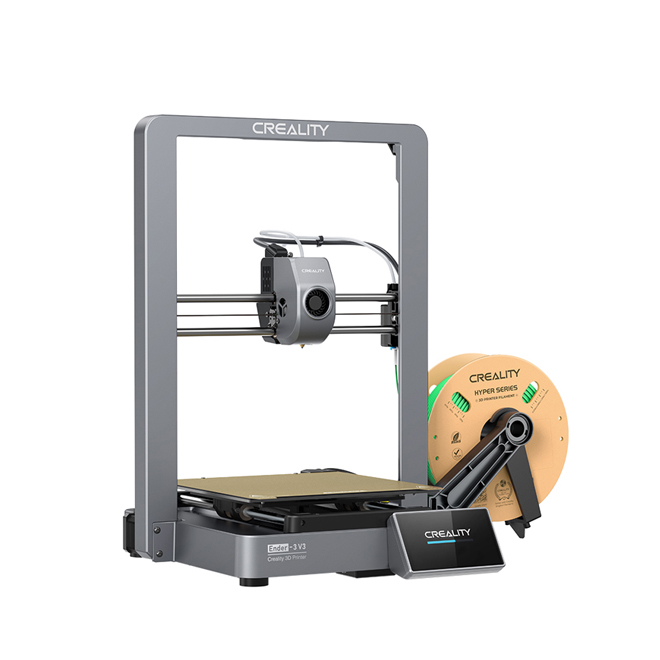
The Creality Ender-3 V3 is the printer that finally drags the Ender line into the high-speed era — a 220 × 220 × 250 mm machine with a completely new CoreXZ motion system, up to 600 mm/s printing, automatic bed levelling and a 300°C hotend, all in the compact, open-frame shape Ender owners already know. It sits in our Best Creality 3D Printer Reviews list as the best full-feature Ender, and in this dedicated review we go deeper: what CoreXZ actually changes, where the speed is real and where it is just a headline number, and exactly who should (and should not) buy one.
Our verdict up front: if you want the fastest, most automatic Ender ever made without stepping up to an enclosed CoreXY machine, this is it. The V3 is not the cheapest Ender — the V3 SE holds that title — but it is the one that feels like a current-generation printer, and for most hobbyists it is the sweet spot of the whole V3 family.
Creality Ender-3 V3: Quick Specs
| Build volume | 220 × 220 × 250 mm |
| Kinematics | CoreXZ — X and Z axes coupled, driven together by two motors and belts; no Z lead screws |
| Max speed | 600 mm/s (20,000 mm/s² acceleration); Creality lists 300 mm/s as typical |
| Hotend | 60W ceramic heater, up to 300°C, direct-drive extruder, clog-free design |
| Calibration | Fully automatic: auto bed levelling, auto Z-offset, auto input shaping (G-sensor included) |
| Build plate | Textured PEI magnetic flexible plate |
| Cooling | Dual part-cooling fans |
| Firmware | Creality OS (Klipper-based), Wi-Fi connectivity |
| Dimensions / weight | 358 × 374 × 498 mm; 7.83 kg |
| Filaments | PLA, PETG, TPU, ABS, PLA-CF, PETG-CF and other common filaments (open frame — see limitations) |
What CoreXZ Actually Changes
Every Ender before this one was a conventional Cartesian bed-slinger: the X axis rode on the gantry, the Z axis climbed lead screws, and speed was limited by how much mass had to move and how much it vibrated. The V3 throws that layout out. In the CoreXZ system the X and Z axes are rigged together, so two high-torque motors work in unison through belts, the moving parts are roughly 30% lighter, and the belts tension themselves automatically — no more belt slips, jams, or manual tensioning, and Z positioning is precise to under 15 microns, which is what keeps Z-banding down.
The practical result is the headline number: up to 600 mm/s, with acceleration up to 20,000 mm/s², and a Benchy in around 13–15 minutes in published tests. But the number that matters more day to day is the one Creality lists as typical — 300 mm/s. That is the speed at which the V3 prints well, consistently, without you babysitting it. Treat 600 mm/s as the ceiling for simple, fast-draft parts, and 300 mm/s as the real working speed, and you will not be disappointed.
Speed and Print Quality
On PLA and PETG, the V3’s quality at typical speeds is a clear step up from the older Ender-3 V2 / Pro generation: cleaner walls, less ringing thanks to the automatic input-shaping calibration, and strong overhangs from the dual cooling fans. The rigid single-piece aluminium frame helps too — there is no frame-squaring ritual, and the gantry stays square because it was built that way, not because you assembled it carefully.
The 60W ceramic hotend heats to 300°C quickly and keeps up with high flow rates, which is what actually makes high-speed printing possible — a printer that can move at 600 mm/s but cannot melt filament fast enough is just waving its head around. The direct-drive extruder handles flexible TPU far better than the old Bowden setup, and the clog-free design is a genuine quality-of-life improvement for anyone who has dismantled a hotend mid-print.
One honest limit: this is an open-frame printer. ABS and ASA will print, but without an enclosure they warp and split on larger parts, just as they do on every open machine. If engineering filaments are your main work, the enclosed K1C or the K2 Plus Combo review is the honest upgrade path — the V3 is a PLA/PETG/TPU machine first.
Auto Levelling and the Beginner Experience
This is where the V3 earns its place as a first printer. There are no levelling knobs to turn and no paper test: the printer levels itself, sets its own Z-offset, and runs an input-shaping test before you start printing. Out of the box it is largely assembled, and the first print comes quickly after unboxing.
That automation is the real story of this machine, more than the speed. The old Ender rite of passage — a weekend spent levelling, tuning and re-levelling — is mostly gone. You still need to learn the hobby (slicer settings, filament storage, bed adhesion), and our step-by-step Ender 3 calibration guide still applies when something goes wrong. But the machine no longer fights you on the basics, and that is why it works as a beginner printer despite being the fastest Ender ever made.
The V3 Family: V3 vs V3 SE vs V3 KE vs V3 Plus vs V3 Neo
The V3 name now covers a family, and the differences are worth getting right before you buy:
- Ender-3 V3 (this printer): the full-feature original — CoreXZ, 600 mm/s, 300°C hotend, auto everything. Best-equipped Ender in the standard size.
- Ender-3 V3 SE: the budget starter — same 220 × 220 × 250 mm volume, but 250 mm/s and a simpler feature set. Cheapest safe start; the value bar of the range.
- Ender-3 V3 KE: the mid-step (500 mm/s, CR Touch levelling, Sprite extruder) — now effectively replaced in the lineup by the newer V4 Combo.
- Ender-3 V3 Plus: the same CoreXZ system stretched to 300 × 300 × 330 mm. Same speed, bigger parts — buy this one only if you regularly need the extra volume.
- Ender-3 V3 Neo (launched Oct 2026): the newest beginner model — fully auto levelling, quick-swap nozzle and up to 500 mm/s in the same compact size, with a 4-colour Combo option. It is the direct successor to the SE as the beginner pick, not a replacement for the full-feature V3.
In short: SE for the lowest entry cost, Neo for the newest beginner experience, V3 for the best-equipped standard-size Ender, V3 Plus for large parts. The V3 is the one to buy when you want the full CoreXZ experience and do not need the Plus’s extra size.
Noise and Day-to-Day Living
High-speed printing is never silent, and the V3’s dual fans are audible at full speed — in the same room it is noticeable, behind a closed door it is a non-issue. At typical 300 mm/s speeds it settles to a steady hum. Day to day the routine is simple: the PEI plate releases prints easily once cool, filament loads through the direct-drive extruder without Bowden-tube wrestling, and Wi-Fi printing through Creality OS means you send files from your desk instead of shuffling SD cards.
Pros and Cons
What we like
- CoreXZ motion — genuinely faster and more stable than any previous Ender, with auto belt tensioning
- 600 mm/s ceiling with a realistic 300 mm/s working speed, backed by a 60W 300°C hotend that can keep up
- Fully automatic levelling, Z-offset and input shaping — no knobs, no paper test
- Direct-drive extruder: TPU and flexible filaments finally work properly on an Ender
- Textured PEI plate, dual cooling fans, Klipper-based firmware with Wi-Fi
- Compact 220 × 220 × 250 mm footprint that fits a normal desk
What could be better
- Open frame — ABS/ASA warp on larger parts, as with every open printer
- 600 mm/s is a ceiling, not an everyday speed; expect 300 mm/s in practice
- 220 × 220 × 250 mm is modest if you print large parts — the V3 Plus exists for a reason
- No multicolour option on this model — colour printing needs the V3 Neo/V4 Combo or the K2’s CFS
- Single-colour, single-material printing only; no enclosed chamber or air filtration
Who Should Buy the Ender-3 V3?
Buy it if you want the best-equipped Ender in the standard size, you print mainly PLA, PETG and TPU, and you want speed and automation without paying for an enclosed CoreXY machine. It is also the right step up from an old Ender-3 / V2 / Pro: everything you learned still applies, but the levelling, speed and reliability frustrations are largely gone.
Skip it if you are on the tightest budget (the V3 SE prints the same size for less), you print large parts regularly (look at the V3 Plus), you need multicolour printing (the V3 Neo Combo or a K2), or your main filaments are ABS, ASA and nylon (you need an enclosure — see our K2 Plus Combo review). Every printer in our Creality 3D printers hub exists because different makers need different tools — this one is the fast, automatic, everyday Ender.
Creality Ender-3 V3 FAQs
What is the difference between the Ender-3 V3 and the Ender-3 V3 SE?
The V3 is the full-feature model: CoreXZ motion, up to 600 mm/s, a 300°C hotend and full auto calibration. The SE is the budget starter in the same 220 × 220 × 250 mm size, capped at 250 mm/s with a simpler feature set. Same build volume, very different speed and automation.
How fast does the Ender-3 V3 actually print?
Creality rates it at up to 600 mm/s with 20,000 mm/s² acceleration, and lists 300 mm/s as the typical speed. In practice, 300 mm/s is the realistic working speed for quality prints; 600 mm/s is the ceiling for fast, simple parts.
What is CoreXZ?
CoreXZ couples the X and Z axes so two motors drive them together through belts, instead of the old setup with Z lead screws. The moving parts are lighter, the belts tension themselves, and Z positioning is more precise — which is how the V3 reaches high speeds without the vibration and Z-banding of older Enders.
Can the Ender-3 V3 print ABS?
It can, with the 300°C hotend, but it is an open-frame printer, so larger ABS and ASA parts are prone to warping and layer splitting. For regular engineering-filament work, an enclosed printer is the honest choice.
Is the Ender-3 V3 good for beginners?
Yes — it is one of the best beginner options in the range, because levelling, Z-offset and input shaping are all automatic. The V3 SE is cheaper and the V3 Neo is the newest beginner model, but the V3 itself is easy to live with from day one.
Final Verdict
The Ender-3 V3 is the Ender line growing up: the same approachable, open-frame printer, now with a modern motion system, real speed and calibration that takes care of itself. It does not try to be a K1 or a K2 — no enclosure, no multicolour — and it does not need to. For everyday PLA, PETG and TPU printing at a speed the old Enders could never reach, it is the best full-feature Ender you can buy, and the one most hobbyists in the standard size should choose.
Hassan Khan

Hassan Khan writes about Creality 3D printers at Creality Lovers — reviews, setup guides, upgrades and troubleshooting from hands-on printing experience.